 ServiceXG Basics
Service Provider Summary
Access all the service providers associated with the selected billing provider. The billing provider will have a check mark clearly identifying the billing provider.
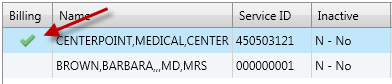
Summary table descriptions
|
Billing
|
A check mark indicates that this provider is the billing provider.
|
|
Name
|
The provider who renders the services submitted by the billing provider.
|
|
Service ID
|
The service provider's ID number.
|
|
Inactive
|
Indicates if the provider is inactive.
- Y—Yes—The provider is inactive. Operators will not be able to select this service provider when entering a claim.
- N—No—The provider isn't inactive; the provider is active.
|
|
Type
|
This is a user-defined code setup to identify different types of providers, for example, hospitals, labs, anesthesiologists, and radiologists.
|
|
Audit
|
Indicates if claims from this provider are automatically selected for audit. The claim will automatically have an HA status applied and the A11 (provider audit) audit code.
- Y—Yes—The provider's claims are selected for audit.
- N—No—The provider's claims are not selected for audit.
|
|
NPI
|
The service provider’s National Provider Identifier (NPI). This is a 10-digit ID assigned to the provider by the National Plan and Provider Enumeration System (NPPES). It is possible for service providers under one billing provider to have the same NPI. For example, groups or organizations with multiple subparts could share the same NPI.
|
In the Service Provider Summary table, double-click a row to view details such as the service provider's demographics, PPO information, and claim matching criteria.
Demographics
The Demographics tab shows the service provider's address along with the provider's ID and any specialty, license, and hospital affiliation information. See * indicates a required field for more information.
Demographics field descriptions
* indicates a required field
|
Name
|
Last Name*— The individual's last name.First Name— The individual's first name.Middle Name— The individual's middle name. You can enter a middle initial rather than a full name.Prefix— A title that displays at the beginning of a person's name to indicate marital status and gender, education, or occupation, (e.g., Dr., Mrs., PhD, etc.)Generation— Suffix to distinguish persons that share the same name in a family, (e.g. Jr., II, Sr, etc.) Select a generation from the list.Title— A professional or some other designation that comes at the end of a name, for example, CPA, MD, ESQ, etc. Select a title from the list.
|
|
Additional Information
|
Provider ID*— The service provider's ID number. This value can be entered by clicking  to assign the next available number. The first service provider will always have a service ID equal to the Billing Provider ID. to assign the next available number. The first service provider will always have a service ID equal to the Billing Provider ID.NPI— The service provider’s National Provider Identifier (NPI). This is a 10-digit ID assigned to the provider by the National Plan and Provider Enumeration System (NPPES). It is possible for service providers under one billing provider to have the same NPI. For example, groups or organizations with multiple subparts could share the same NPI.Type—This is a user-defined code setup to identify different types of providers, for example, hospitals, labs, anesthesiologists, and radiologists. Select a provider type from the list.Inactive—Indicates the service provider is inactive. Operators will not be able to enter claims for inactive service providers.Suppress PPA—If this check box is selected, the window won’t display and the operator won’t be able to process prior payment adjustments. If there is a prior payment adjustment for either the provider or member, the claim will be pended (P28). Suppress Checks/EOBs—If this check box is selected, no checks or EOBs will be sent to the provider.
|
| Comments |
Additional information associated with the provider. Include information that will help operators quickly respond to inquiries about the provider. The comment can be up to 50 characters long.
- The provider demographics data tile will display the first few characters of the comment. Point at the
 icon to see the whole comment. icon to see the whole comment.
|
| Alert |
Important or critical information about the provider. Include information that operators need to know about the provider or provider's information on file, or if the provider requires special handling. The alert can be up to 150 characters long.
- The Claims or provider demographics data tile will show an alert icon
 next to the billing provider's name at the top. Point at the icon to see the whole alert. next to the billing provider's name at the top. Point at the icon to see the whole alert.
- The alert shows in the Provider Alerts window and in the Alerts tab when processing a claim associated with the provider. You can add a date range to limit the alerts.
|
|
Specialties and Affiliations
|
Specialty— The service provider's specialty. Certified—Indicates if the provider is board certified in the specialty. Y—Yes—The provider is certified for this specialty.N—No—The provider isn't certified for this specialty. P—Pending—The provider is pending certification for this specialty.
-
License ID—The service provider's state license number.
Hint: Because a provider may be licensed in multiple states, you could use the format, State Code*License ID, to easily identify where the provider is licensed. For example, MD*C24801.
Hospital Affiliation—The AHA codes for hospitals that this service provider has admitting privileges.
|
| Provider SPRID |
The provider's ID assigned by a third-party vendor. |
PPO
The PPO tab lists information about the preferred provider organization associated with the service provider. See Update, add, delete, or associate PPO information.
The Additional Information tab lists the provider's discount information, incentive plans, and other IDs.
Additional Matching Criteria
The Additional Matching Criteria tab contains additional information about the provider, such as common misspellings or alternate names, that can be used to match providers on incoming electronic claims before the claims are loaded into the system.
Depending on your system's (user-defined) service provider matching rules, the service provider information on electronic claims is compared with service provider information on file including the information on the Additional Matching Criteria tab.
Operators can manually update the information on this tab or it can be automatically updated during the claim load process (at the operator's direction) to improve provider matching on future incoming claims.
SEE ALSO